Got a promo code? Use it when you book directly on our booking page.
In short
- Open our booking page.
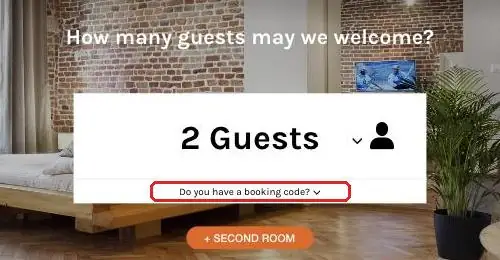
- Click “Do you have a booking code?” under the number of guests and enter your code.
- The discounted prices are shown before you pay.
Steps
- Open the booking page.
- Choose the number of guests.
- Click “Do you have a booking code?” directly under the number of guests.
- Type or paste your code and confirm with the arrow.
- Select your arrival and departure dates – the prices shown already include your discount.
Code not working?
Check that there are no spaces before or after the code and that it is valid for your dates. If it still does not work, contact the reception at +48 12 420 70 50 or on WhatsApp +48 515 546 369.
